Structure of antora document projects
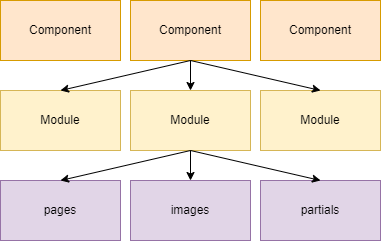
Components: Each component can have its own specific target addressee; end user, admin etc. and:
-
exist independently of each other
-
can refer to each other
-
have their own names and version numbers
-
can contain several modules
Components can be distributed across several folders, branches and repositories.
Modules
* * has a fix structure (families) pages images examples attachements ** partials (snippets; can be included in several positions)
File order and locations
All files has to be located under a content source root. This folder has to contain an antora.yml file (see respective section).
repository
  - docs (1)
    - antora.yml (2)
    - modules (3)
    - non-docs-directory (4)
| 1 | content source root |
| 2 | component version descriptor |
| 3 | modules folder |
| 4 | folder Antora won’t process |
Example:
.
│ antora.yml
└─modules
  └─ROOT
    │ nav.adoc
    ├─attachements
    ├─examples
    ├─images
    │   image_1.png
    │   image_2.png
    ├─pages
    │   index.adoc
    │   page_1.adoc
    │   page_2.adoc
    │   page_3.adoc
└─partialsantora.yml
This file signals to Antora it can find a sibling modules folder containing files belonging to a component version. All files and subfolders of that modules folder be considered as a part of a component folder.
name: authentik_admin (1)
version: 1.0 (2)
title: Authentik Admin Guide (3)
nav: (4)
  - modules/get-started/nav.adoc (5)
  - modules/ROOT/nav.adoc (6)
| 1 | *) Component name. The name is only allowed containing lower case letters, numbers, underscores (_), hyphens (-), and periods (.). The name cannot be empty. Note that this names are used in the site urls. [source] |
| 2 | *) Version can be defined as unversioned by assigning a tilde, ~. A version is the value resolved from the version key in a component version descriptor file (antora.yml) or inherited from the content source in the playbook. [source] |
| 3 | Title is the component name used for sorting, breadcrumbs etc. Empty spaces, uppercase letters and other characters are possible. |
| 4 | To enable visitors to find and call a page via a page menu of a component version, a cross-reference to this page must be placed in a list in a navigation file [source]. Also see section |
| 5 | Registers a navigation file inside the get-started module folder. |
| 6 | Registers a navigation file inside the ROOT module folder. |
*) required
Navigation files
Usually the files are called nav.adoc, but it does not matter how they are named actually. But the file extension .adoc is mandatory.
source
Types of navigation lists
- Navigation list
-
is an unordered AsciiDoc list. Each top-level list item can nested items up to level five (*).
* Item 1
** Item 1.1
* Item 2
** Item 2.1
*** Item 2.1.1
*** Item 2.1.2
** Item 2.2
- Multiple list
-
if a navigation file contains multiple lists, each list must start with a dot denotated list title.
.Title 1
* Item 1

.Title 2
* Item 1
** Item 1.1
Titles are unlinked text.
List content
.Project One
* xref:index.adoc[] (1)
** xref:ROOT:initialize_project.adoc[link text] (2)
** xref:module:file.adoc[] (3)
** xref:team::contributing.adoc[] (4)
* xref:version@component:module:file.adoc[] (5)

._Further Material_ (6)
* https://info.project.one[Project One] (7)
* xref:faq.adoc[*FAQs*] (8)
| 1 | xref to the page inside the same module as the navigation file; the default navigation link text is the pages title (section level 0). |
| 2 | xref to a page of another module than the navigation file is located |
| 3 | xref to the same component version, but a different module |
| 4 | same as 3 (same component version, but a different module) |
| 5 | xref to a page from another component than the navigation file is located |
| 6 | inline formatted title |
| 7 | link to a website |
| 8 | xref with formatted link text |